
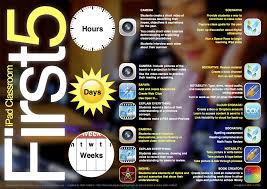
This year my teachers are working with iPads as personal tools each day. We’d love to provide students with these tools in a 1:1 configuration, just not there yet with funding. In the meantime we have mobile learning labs for students…iPads, iPod touches, NetBooks and MacBooks. Digital Cameras too. Tech integration is alive and well and getting better all the time.
Using iPads, making iPads your go-to tool when they’re new to your toolbox is challenging. Thank you to Richard Wells for the illustration above and for breaking this down into small parts.
At Mobile Learning Equity we’ve actually been talking about this, recommending it since iOS began. The iOS platform is incredibly powerful and can be amazingly simple taken in small bites. To begin, for teachers and students, we’ve recommended four tools. Working with the power of a search engine [Safari], notes [Notes], photos and videos [Camera] that can be saved, organized and sent and a reference tool [Merriam-Webster Free Dictionary] that speaks and listens we believe is a terrific start. See the app icons below.
Teachers have plates that were already full before the year began. As November approaches don’t feel guilty if you’re not using fifty apps. Or if your iPad sits unused under piles of work to be graded and and displayed and prepared. Instead give yourself permission to try just four tools for the next weeks ahead. And then just enjoy for a bit. You’ll get to fifty or maybe… you don’t actually need fifty…
Safari
Camera
Notes

Dictionary