
My STEM gift-giving guide continues. Part II focuses on coding for kids. Why focus on coding? Because everything that runs around us has computer programming, or code, making it function and run. Learning to code allows learners to stop consuming and begin creating. And there’s another really important reason to learn, coding is fun!
So take a look at my top coding app choices and grab a handful to include in your gifting this season. As you and your kids get started, head to Code.org http://code.org and sign the petition if you agree – “Every student in every school should have the opportunity to learn computer science”. And then start learning with your first Hour of Code http://hourofcode.com/us during Computer Science Education Week December 8-14, 2014!
1. Lightbot and Lightbot Jr
Platform: iOS, Android, http://lightbot.com
Cost: Free to $2.99
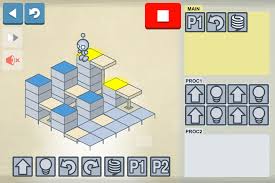
Kids drag and drop basic commands including move, hop, light, and turn, into strings of instructions all led by a very cute programmable robot. This is a perfect starting place, begins with easy to attain success. As your child learns more the program gets more challenging.
2. Tynker
Platform: iOS, Android, http://www.tynker.com/why-tynker
Cost: Free-$5.99
Tynker is one of my campers favorite coding apps. It provides games to teach programming. Kids engage with interactive learning modules, mini-games, coding projects and puzzles.
3. Scratch Jr.
Platform: iOS, http://scratch.mit.edu
Cost: Free
Cost: Free
Designed by MIT students and staff in 2003, Scratch was one of the first programming languages created specifically for young people. Scratch uses a visual programming language made up of bricks to drag to the workspace and animate sprites. Various types of bricks trigger loops, create variables, initiate interactivity, play sounds, and more.
4. Hopscotch
Platform: iOS, http://www.gethopscotch.com
Cost: Free
Kids make games, animations, stories, and other interactive programs by dragging and dropping colorful blocks of code. Use shaking, tilting, or even shouting at the iPad to control characters.
5. Daisythe Dinosaur
Platform: iOS
Cost: Free
Daisy the Dinosaur is written by the makers of Hopscotch. This game is written for the youngest coders. There is a dinosaur to move and basic functions to use.
6. Cargo-Bot
Platform: iOS, Android, http://twolivesleft.com/CargoBot/
Cost: Free
Cargo-Bot teaches coding skills. The objective is to move colored crates from one place to another by programming a claw crane to move left or right, drop or pick up. Elementary students will learn the logical thinking required to eventually do text-based programming.
7. Kodable
Platform: iOS, https://www.kodable.com
Cost: Free-$6.99
The free version includes the first level, Smeeborg, which introduces kids to the steps of programming, including if/then statements and loops. Additional levels include- Function Junction, which introduces functions, Bugs Below, to debug code; and Fuzzy Fun, playing with colors and letters.
8. Bee-Bot and Bee-Bot Pyramid
Platform: iOS, http://www.bee-bot.us
Cost: Free-$0.99
Kids use a bee to move through easy puzzles with directional language, forwards, backwards commands and turns. This app can be a companion to the Bee Bot, programmable floor robot.
9. Cato’s Hike: A Programming and Logic Odyssey
Platform: iOS
Cost: $4.99
Takes kids on a story-based adventure through mazes to collect hearts and stars and find friends, using the logic of computer programming to guide their character.
10. Move the Turtle. Programming for Kids
Platform: iOS, http://movetheturtle.com
Cost: $2.99
A friendly Turtle introduce kids to step-by-step basic concepts of programming in a fun graphic environment.